CoinArchive app icon

CoinArchive for macOS

Preserve the coin.
And the story behind it.

Keep obverse and reverse photos, certification, provenance and dated owner-entered values in a private Mac archive that never locks your collection into a marketplace.

Made for Mac macOS 14+ Apple notarized
Made for MacNative SwiftUI app
Apple notarizationCompleted before launch
One-time purchase$29 · No subscription
Provenance firstCertificates + ownership trail
Portable reportsPDF, CSV, JSON + images
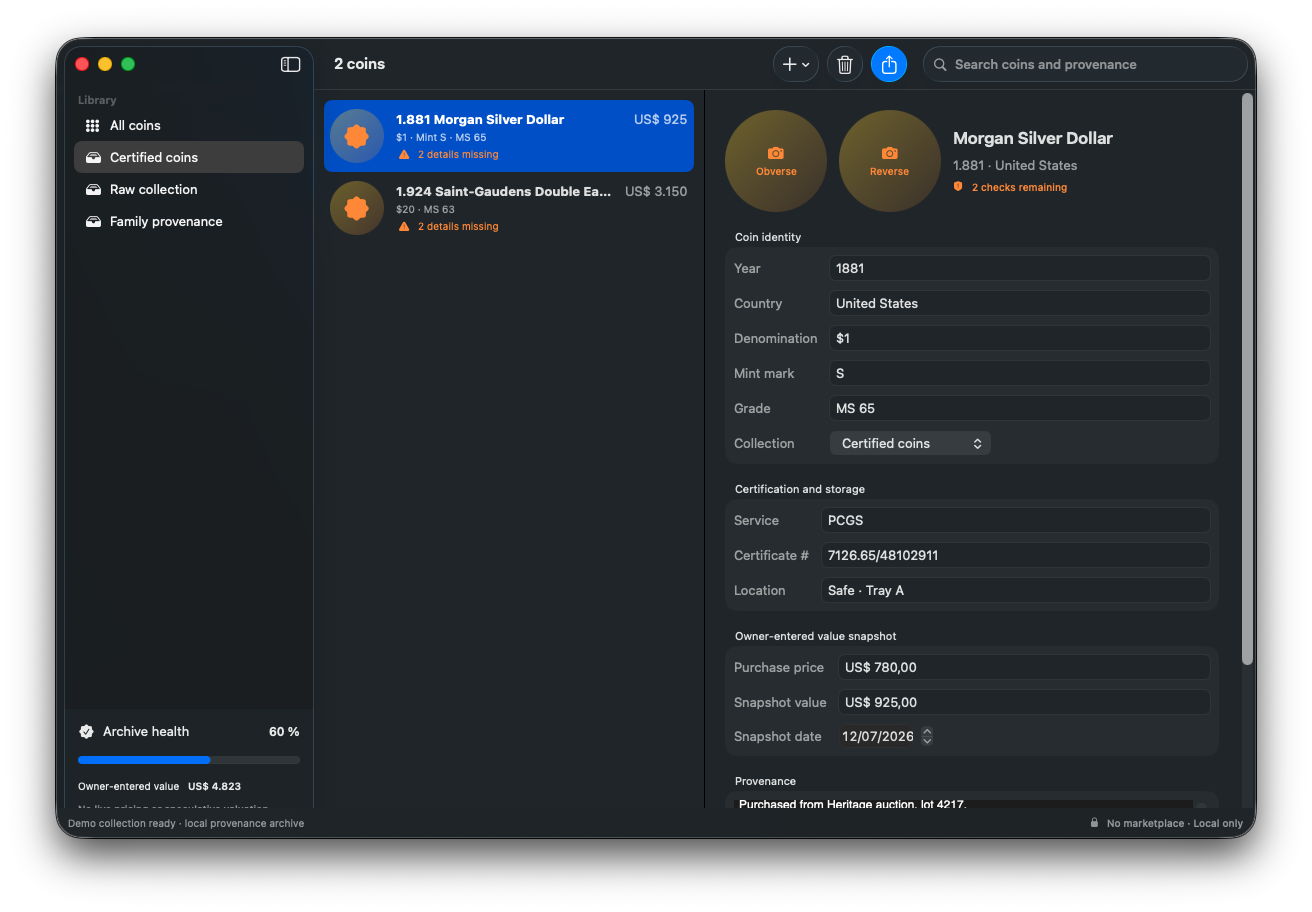
CoinArchive running on macOS with certified coin records, certification, storage and provenance details
Fragmented

Photos · slabs · invoices · notes

Archived

One durable provenance record

Actual Release build · fictional collection

The record travels
even when the app does not.

The native app keeps identity, certification, storage, provenance and owner-entered value snapshots together without pretending to grade or price the coin.

CoinArchive 0.1.0 · macOSREAL RELEASE BUILD
CoinArchive running on macOS with certified coin records, certification, storage and provenance details
Captured from the native Release build with fictional collection records and no marketplace data.View full size ↗

Where it earns its place

Four collections that outlive a spreadsheet.

01

Certified coins

Keep slab numbers, photos and certificate files beside the owner record.

02

Raw collection

Document identity and location without claiming an automated grade.

03

Family provenance

Preserve inheritance notes and photographs of original envelopes or records.

04

Estate and insurance

Export a readable report with source files another person can open.

WHAT YOU KEEPCoinArchive Estate Report.pdfcoin-inventory.csvCoin Evidence/No marketplace dependency

The provenance gap

Value changes. Provenance should not disappear.

A coin record is more than a current number. Certification, purchase source, storage location, photographs and inherited context explain what the object is and where it came from.

CoinArchive stores that evidence locally and lets the owner record dated value snapshots without presenting speculative pricing as fact.

A durable collection workflow

Document the object, source and snapshot.

  1. 1

    Create collections

    Separate certified coins, raw pieces, sets or family provenance in a way that matches the physical archive.

  2. 2

    Photograph both sides

    Keep obverse and reverse images with year, country, denomination, mint and grade notes.

  3. 3

    Record provenance and certification

    Attach the certificate, source, storage location and any ownership context that matters.

  4. 4

    Export a portable archive

    Receive a ZIP with PDF, CSV, JSON and evidence files that do not require CoinArchive to read.

CoinArchive Estate Report.zip✓ portable
CoinArchive Estate Report/
├── CoinArchive Estate Report.pdf
├── coin-inventory.csv
├── coin-inventory.json
└── Coin Evidence/
    ├── morgan-obverse.jpg
    ├── morgan-reverse.jpg
    └── morgan-certificate.pdf

No pricing theater

A dated snapshot, not a promise.

CoinArchive records values entered by the owner and the date of that snapshot. It does not auto-grade, trade, scrape marketplaces or guarantee valuation.

  • No marketplace account
  • No automatic grading claim
  • Certificates and images stay encrypted locally
  • Estate and insurance exports use readable files

Before you buy

CoinArchive FAQ

Does CoinArchive identify or grade coins automatically?+

No. The first release records information supplied by the owner. It does not claim to identify, authenticate or grade a coin.

Does it show live coin prices?+

No. You enter a dated value snapshot and its context yourself, keeping speculation separate from the provenance record.

Can I attach PCGS or NGC information?+

Yes. You can store the certification service, number and a certificate file alongside the coin record.

Can my family read an exported archive without the app?+

Yes. The ZIP contains PDF, CSV, JSON and ordinary image or certificate files.

How much will CoinArchive cost?+

The planned launch price is US$29 as a one-time purchase for one Mac, with no subscription.

Which payment methods will be available?+

At launch, Polar will process checkout as the merchant of record. Available cards and eligible wallets depend on your country, browser and device, and applicable tax is calculated at checkout.

CoinArchive app icon

CoinArchive for macOS

Keep the record with the coin.

Create a private archive for photos, certification, provenance and reports your collection can carry forward.

  • macOS 14+
  • One Mac
  • Free launch updates
One-time purchase$29No recurring charge

Signed with Developer ID and notarized by Apple.